
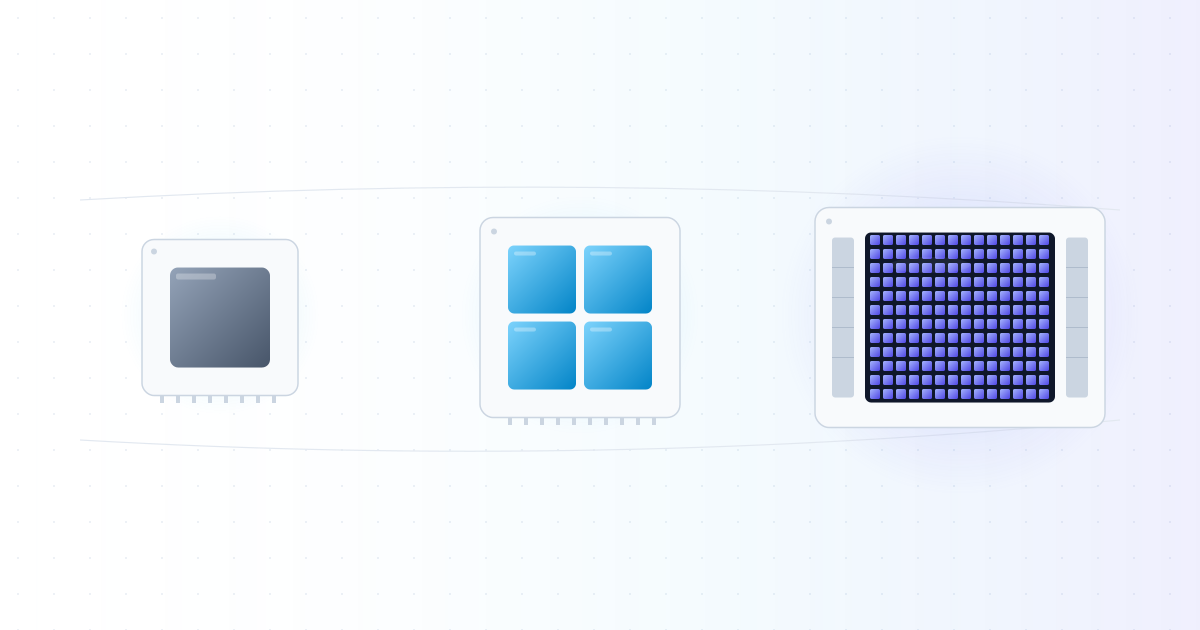
If you have spent any time around AI in the last few years, you have heard the same story. A new model came out. It was trained on thousands of GPUs. It cost tens or hundreds of millions of dollars. The chips were hard to get. NVIDIA's stock went up again.
You probably also noticed something else. Nobody trains AI on CPUs. Nobody serves a chatbot from a CPU. Even the laptop you are reading this on has both a CPU and a GPU, and only the GPU does anything when you run a local model.
So the obvious question is, why? CPUs run everything else in computing. Operating systems, databases, web servers, compilers. They have been getting faster for 50 years. Why did AI suddenly need a different chip?
This post is the first in a 3-part series that answers that question. By the end of all three parts you should have a working mental model of GPUs that is good enough to follow any AI infrastructure conversation.
- Part 1 (this one) is the story. How compute for AI evolved from CPUs to GPUs, and why this was not really a choice, more like the only path that worked.
- Part 2 opens up a GPU and shows what is inside. Streaming multiprocessors, CUDA cores, threads, memory hierarchy, tensor cores. The actual mechanics.
- Part 3 covers modern AI hardware. H100, H200, B200, NVLink, HBM, NVL72 racks, and the alternatives like TPUs and AMD MI300X.
I am writing this for software engineers who know how computers work but never had a reason to look inside a GPU. If you have written code, used Linux, deployed something to a cloud, you already have enough background. The math will stay simple.
If neural networks are new to you, read How Neural Networks Work first. It will make some parts of this post easier.
Let me start.
What a CPU is actually good at
Before talking about GPUs, you have to be clear about what a CPU is. Most people who use computers every day have only a vague picture of it. Software engineers usually have a slightly better one. Let me sharpen it.
A CPU is a small chip with a few cores. A core is the thing that runs your code, one instruction at a time. Each core has its own pipeline, its own caches, and its own little bit of state.
The number of cores has gone up over time. A laptop CPU in 2026 has maybe 8 to 16 cores. A high-end server CPU might have 64 or 128. But each one of those cores is a very serious piece of engineering. It can do branch prediction, out-of-order execution, speculative execution, deep pipelines, multi-level caches. The core spends a lot of transistors trying to make a single thread of code run as fast as possible.
This makes sense for the kind of work CPUs were built for. Most code branches a lot. You read a file, check a condition, take one path, then another. You parse JSON, you handle a network packet, you respond to a click. The work is unpredictable and full of decisions. A CPU is built to do this kind of work fast.
The mental model is: a CPU has a few smart workers. Each one is fast and can handle anything you throw at them, but there are not many of them. If you give a CPU a problem that is mostly sequential and full of branches, you are using it well.
But there is a different kind of problem. Imagine you have to add two arrays of one million numbers each, element by element. The work has no branches. Every step is the same operation. There are no decisions. Every output is independent of every other output.
A CPU will do this, but it is wasteful. The CPU's smart features (the branch predictor, the out-of-order engine, the speculative execution) are doing nothing useful here. The work is so simple that you do not need a smart worker. You need a lot of simple workers, all doing the same thing at the same time.
That is the kind of problem a GPU is built for.
What a GPU is, in one sentence
A GPU is a chip with thousands of small, simple cores designed to do the same operation on lots of data in parallel.
That is the idea. Many cores instead of a few. Each core is much simpler than a CPU core, with no branch predictor, no speculative execution, no fancy tricks. But there are thousands of them, and they all run at the same time.
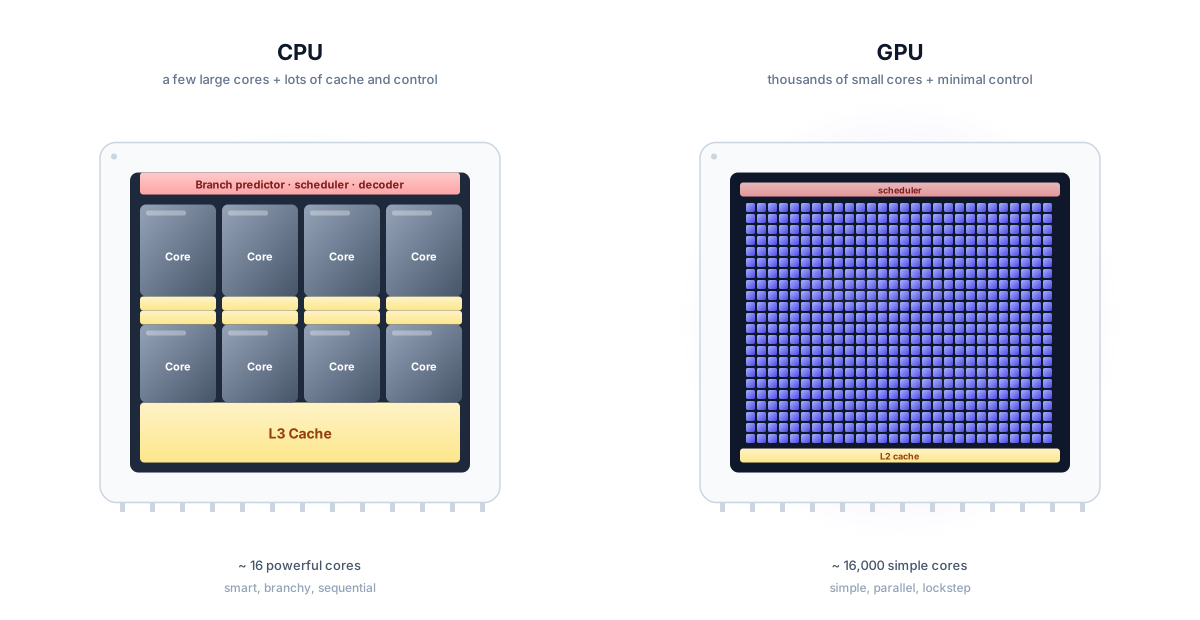
To make the difference concrete: a high-end CPU in 2026 has around 64 to 128 cores. A high-end GPU like the NVIDIA H100 has 16,896 small cores, plus 528 specialized "tensor cores" for matrix math. The B200, NVIDIA's newer chip, pushes this further. The number of cores is not roughly bigger, it is two orders of magnitude bigger.
The catch is that a GPU is not faster at everything. It is much slower than a CPU at running a single thread of branchy code. If you give a GPU a Python script with if statements and lots of decisions, it will be terrible. The GPU is only good when the work is parallel and uniform. The same operation, on lots of data, with no branches.
So the question becomes: what kind of work is parallel and uniform? Why does AI happen to be exactly that kind of work?
What a neural network actually computes
This is where the AI story connects to the chip story.
Strip a neural network down to its math, and the answer is short. It is mostly matrix multiplication. Billions of multiply-and-add operations, arranged into matrices.
If you read How Neural Networks Work, you saw that a neuron is a weighted sum. You take some inputs, multiply each one by a weight, add them up, and squash the result. A layer is many neurons, each doing the same thing on the same inputs. A network is many layers stacked.
If you write all of this as math, every layer turns into a matrix multiplication. The inputs are a vector. The weights are a matrix. The output is the matrix times the vector, plus an activation function on top. That is one layer.
Now think about what matrix multiplication actually is. To multiply matrix (of size ) by matrix (of size ), you compute every cell of the output matrix (of size ). Each cell is the dot product of a row of and a column of .
Here is the important part. Every cell of is computed independently. The value of does not depend on . There are no dependencies between cells. Each one is its own little dot product, and you can compute all of them at the same time.
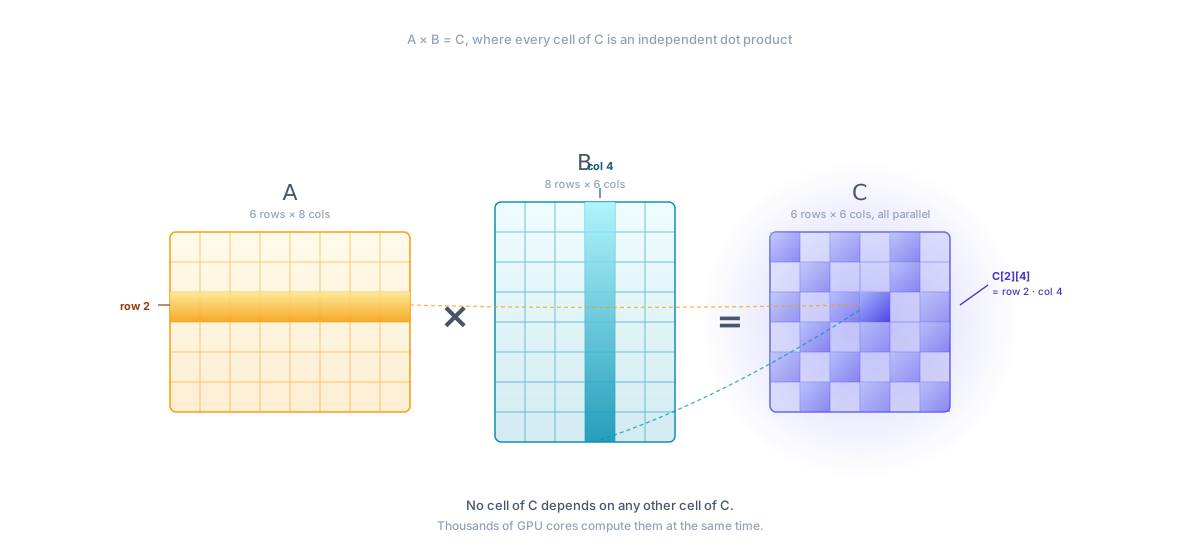
If your output matrix is , that is over a million cells. A million independent dot products. If you had a million workers, you could finish the whole thing in the time it takes one worker to compute one cell. This is what people call "embarrassingly parallel," because there is no real challenge in splitting the work. It is parallel by construction.
A CPU with 64 cores would split this into 64 chunks and process them one chunk at a time. A GPU with 16,000 cores splits it 16,000 ways. The math is the same. The hardware just has more workers.
Modern AI is mostly this, repeated billions of times. A forward pass through GPT-4 is, at its core, a long chain of matrix multiplications. Training is the same chain run billions of times with small adjustments to the weights at each step. The fundamental operation, repeated forever, is matrix multiply.
This is why AI runs on GPUs. The work matches the hardware.
The first compute era: CPUs and the AI winters
The chip story and the AI story did not always line up like this. For most of the history of AI, the only chips that existed were CPUs. AI had to make do.
The first wave of AI ran on mainframes in the 1950s and 60s. The IBM 704, the machine on which the first neural network simulations were written, ran at about 12,000 operations per second. Your phone is around a billion times faster than that. Researchers wrote programs by punching cards and waiting hours for output.
In this era, the bottleneck was not algorithms. It was compute. Even the simplest neural network was too slow to train on the data of the time. So the field went a different direction: symbolic AI, expert systems, and rule-based reasoning. These methods needed less data and less compute. They worked, sort of, until the 1980s, when the limits became obvious. Real-world knowledge does not fit into clean rules.
By the time backpropagation was published in 1986, computers were a lot faster. But still not fast enough. Researchers like Geoffrey Hinton, Yann LeCun, and Yoshua Bengio kept working on neural networks through the 1990s and 2000s. They believed the math was right. They were sure that with more data and more compute, neural networks would beat everything else. But the compute was not there yet.
In the 1990s and 2000s, the dominant approach to machine learning was not neural networks. It was statistical methods: decision trees, support vector machines, random forests, Bayesian models. These methods were good enough to ship: they powered spam filters, search ranking, recommendation systems. They ran fine on CPUs of the time. Neural networks lost in benchmarks and lost in production.
There is a longer version of this history in LLMs Explained, Part 1. For our purposes, the short version is enough: the field knew neural networks could work, but the compute they needed was not affordable.
How GPUs accidentally showed up
In a totally different part of the computing world, video games were getting more complex.
In the early 1990s, 3D games like Doom and Quake started to push the limits of what CPUs could draw. Rendering 3D graphics is, mathematically, a lot of matrix and vector operations: every pixel on the screen has to be transformed, lit, and colored, and you have to do this 60 times per second. The work is, again, parallel by construction. Every pixel can be computed independently.
A new kind of chip showed up to handle this work. They were called "graphics accelerators" and later "GPUs." The first ones, in the late 1990s, were limited and game-specific. The 3dfx Voodoo, the NVIDIA RIVA, the original GeForce. They had no general-purpose programming. You could not write code for them. You could only set up textures and triangles, and the chip drew them.
This started to change in the early 2000s. GPUs got "shaders," which were small programs you could attach to graphics pipelines. Shaders had limits but they were programmable. Some researchers noticed that shaders could be tricked into doing non-graphics math. You could pretend your matrix was a texture, run a shader on it, and read back the result. This was hacky. But it was 10 to 100 times faster than running the same math on a CPU.
A small group of researchers, mostly in academic labs, started using GPUs for scientific computing. Physics simulations, fluid dynamics, computer vision, some early neural networks. The work was painful. You had to write your math in graphics-shader languages. Bugs were brutal to debug. But the speed was real.
NVIDIA noticed. In 2006, they released CUDA.
CUDA: when GPUs became general-purpose
CUDA stood for "Compute Unified Device Architecture." It was a programming model and a software stack that let you write C-like code that runs on the GPU. No more pretending matrices are textures. You could write a function, mark it as running on the GPU, and call it from your normal program.
This sounds like a small thing. It was actually a turning point. CUDA made the GPU usable for serious work. Researchers who had been dabbling with shader hacks switched to CUDA almost immediately. The number of people writing GPU code went from a few hundred to a few hundred thousand within years.
NVIDIA also did something smart on the business side. CUDA was free. The hardware was cheaper than equivalent CPU clusters. The developer tools were good. NVIDIA put a lot of effort into building a community of researchers, releasing libraries (cuBLAS for linear algebra, cuDNN for deep learning later), and supporting universities. By the time the AI boom hit, CUDA was the only serious option, and AMD's competing tools were years behind.
This is part of why NVIDIA is still dominant in 2026. The chip is good. The compiler is good. The libraries are good. The community is huge. Building all of that takes a decade and a strategy. By the time competitors woke up, NVIDIA already had a moat that was as much software as hardware.
2012: the AlexNet moment
The AI part of the story finally meets the GPU part of the story in 2012.
There was a yearly competition called ImageNet. The task was to classify a photo into one of 1000 categories. The dataset had over a million labeled images, much bigger than anything the field had used before. The benchmark was: how often does your model get the right answer in its top 5 guesses? The state of the art, before 2012, was around 26% error.
A team at the University of Toronto entered. The team was Geoffrey Hinton, his student Alex Krizhevsky, and Ilya Sutskever. They built a deep convolutional neural network with 60 million parameters. They trained it on two NVIDIA GeForce GTX 580 GPUs. These were consumer gaming cards, the kind a college student might buy to play games.
Their model, later called AlexNet, won by a huge margin. They cut the error rate to 15.3%, an absurd jump in a benchmark that had been improving by about 1% per year.
Two things happened after AlexNet:
The first was that the entire field of computer vision switched to neural networks within two years. The old methods were dead. By 2015, every paper at the top vision conferences used a deep network.
The second was that everyone realized GPUs were the only way to train these models. The math could not run fast enough on CPUs. The networks were too big. The data was too big. Without GPUs, deep learning did not work.
This was the moment the chip and the algorithm finally lined up. The AI field stopped being compute-bound by something humans could buy and started being compute-bound by something that scaled with money.
What happened next: scale, scale, scale
Once you can train a neural network on GPUs, the next question is: what happens if you make the network bigger? More layers, more parameters, more data, more GPUs.
The answer, surprisingly, was: it just keeps working better. Bigger models trained on bigger data on bigger GPU clusters were better. Researchers started calling this the "scaling hypothesis." For a long time it was just an empirical observation, not a theory. Make it bigger and it gets better. Nobody really knew when or if this would stop.
In the years after 2012, every part of this scaled. The networks got deeper (ResNet in 2015 had 152 layers, when AlexNet had 8). The datasets got bigger (ImageNet was a million images, but soon you had datasets of billions). The number of GPUs in a single training run went from 2 to 8 to 100 to 1000.
In 2017, the transformer paper landed. Transformers were not just better, they were more parallel-friendly than the RNNs that came before them. (For why, see LLMs Explained, Part 2.) This made them even more suited to GPUs. Suddenly every part of the system, the algorithm, the chip, the software, all pointed in the same direction.
Then came the language models. GPT-2 in 2019 had 1.5 billion parameters, trained on a few dozen GPUs. GPT-3 in 2020 had 175 billion parameters, trained on around 10,000 GPUs for a few weeks. GPT-4, released in 2023, was reportedly trained on around 25,000 GPUs for about three months. Modern frontier models in 2026 use clusters of 100,000 GPUs or more.
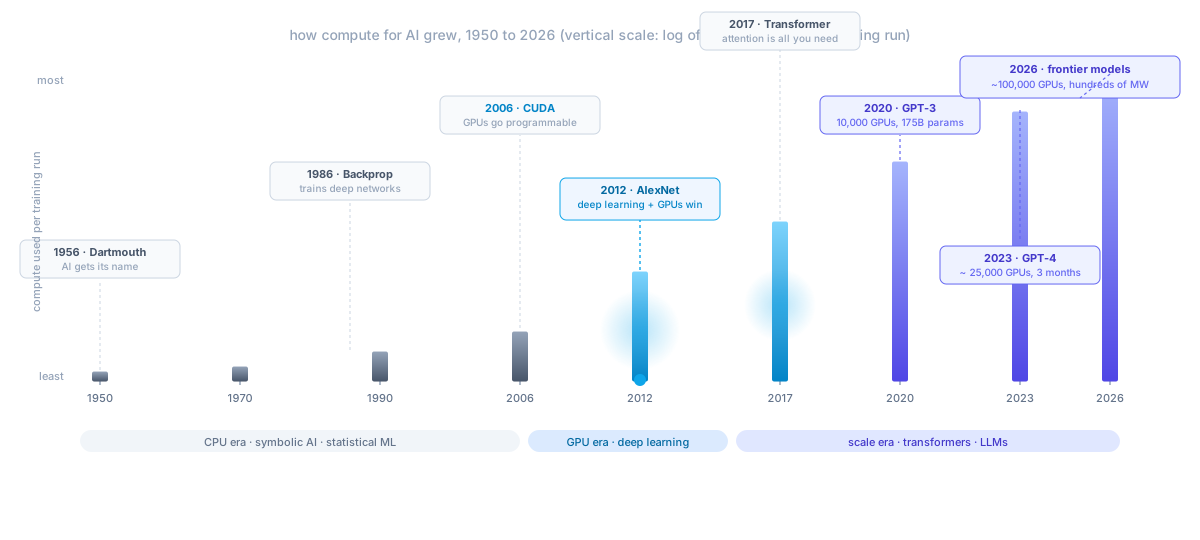
The price of training a frontier model went from hundreds of dollars in 2012 to hundreds of millions of dollars in 2025. The compute side of AI is now its own industry, with its own supply chain, its own bottleneck (NVIDIA, mostly), and its own geopolitics (export controls, fab capacity, energy).
If you are trying to understand AI in 2026, you cannot skip this layer. The model is the algorithm. The hardware is the chip. The thing that ties them together is the compute.
Why CPUs cannot just catch up
You may be wondering: if neural networks are so important, why don't CPUs just add more cores and become like GPUs?
This is a fair question, and the answer is more interesting than it sounds. CPUs and GPUs are different not only because of how many cores they have, but because of where the chip's transistors go.
A modern CPU spends most of its transistor budget on three things:
- Cache. Each core has multiple levels of cache (L1, L2, L3) that are bigger and bigger but slower and slower. Cache exists because main memory is slow. The CPU pre-fetches data, predicts what you will need, and keeps it close. This makes single-threaded code fast, but it costs a lot of die area.
- Control logic. Branch predictors, out-of-order schedulers, register renamers, speculative execution engines. These are the tricks that let a CPU run unpredictable code fast.
- Compute units. The actual math units, the things that add and multiply. On a CPU, these are a small fraction of the chip.
A GPU flips this completely. Most of the chip is compute units. There is some memory and some control logic, but the proportions are inverted. A GPU spends most of its area on math.
You can see why this works in opposite directions. A CPU is optimized for "what if the next instruction is unpredictable?" A GPU is optimized for "the next instruction is the same as the last one." If you tried to add 16,000 cores to a CPU, you would either give up the smart features (and now it is a GPU) or keep them (and now the chip is too big and too hot to build).
There are middle-ground designs. Apple's M-series chips have a GPU built into the same die as the CPU. AMD's CPUs have on-chip GPUs. Some research chips combine the two more deeply. But for the kind of math AI does, there is no escape from the basic tradeoff. If you want to do a lot of the same math at once, you want a GPU.
The same logic explains why specialized AI chips exist. Google's TPUs go even further than GPUs in the "specialize for matrix math" direction. Cerebras and Groq go further still. We will get to these in Part 3. The general pattern is: the more you know about the work, the more you can specialize the chip, and the faster the chip will be at that work.
A short summary of where we are
The big picture in three steps:
The first is that AI is mostly matrix multiplication, repeated billions of times. The math is uniform and parallel. Every cell of the output is independent of every other cell.
The second is that GPUs are chips designed to do uniform, parallel math very fast. They have thousands of small cores instead of a few smart ones. They are bad at branchy code but excellent at the kind of work AI does.
The third is that CPUs and GPUs cannot easily be combined. The transistor budget pulls them in different directions. CPUs are for unpredictable code. GPUs are for predictable, parallel math. AI sits firmly in the second category.
Which is why every modern AI service, training run, and research paper runs on GPUs. The chip and the math are made for each other.
What is next
In Part 2, I will open up a GPU and show what is inside. We will look at streaming multiprocessors, CUDA cores, the memory hierarchy, threads and warps, and tensor cores. After that, in Part 3, we will go up the stack to multi-GPU systems, the H100/H200/B200 family, NVLink, NVL72 racks, and the alternatives like TPUs and AMD MI300X.
If you want a sneak peek of where this leads: the H100 is the chip that trained most of 2024's frontier models. The B200 is the next-generation chip. A modern training cluster has tens of thousands of these connected with high-speed interconnects, drawing tens of megawatts of power. None of this is exotic infrastructure to the people who build LLMs. It is just the new normal of AI.
See you in Part 2.