
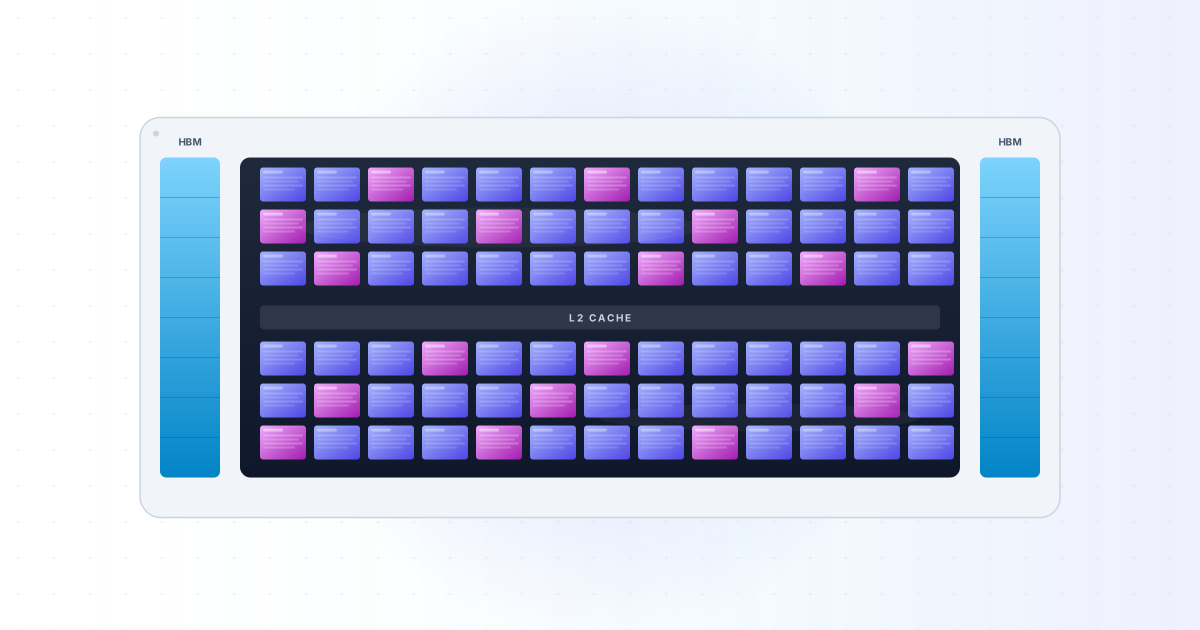
In Part 1 I told the story of how AI ended up on GPUs. The short version is that neural networks are mostly matrix multiplication, and GPUs are chips designed to do matrix multiplication very fast in parallel.
That story explains why GPUs exist. It does not explain how they work. If you want to understand AI infrastructure beyond the surface, you have to know what is actually inside a GPU. The hardware is not magic. It is a specific arrangement of compute units, memory, and schedulers, and once you see the structure, a lot of confusing things become clear.
This post opens up a GPU. By the end you should know what an SM is, what threads and warps mean, why memory bandwidth matters more than compute, and what tensor cores actually do.
I will use NVIDIA terms throughout, because NVIDIA dominates AI hardware. AMD has very similar concepts under different names. Apple, Google, and others differ more. But once you understand one GPU well, the others are easier to pick up.
If you have not read Part 1, start there. It sets up the why before this post explains the how.
A GPU is a chip with many small chips inside
The first thing to know is that a GPU is not one giant compute unit. It is a chip made up of many smaller compute units that work mostly independently. NVIDIA calls each of these units a Streaming Multiprocessor, or SM.
An SM is the basic building block of a GPU. It has its own scheduler, its own registers, its own little memory, and its own set of compute units. When you run code on a GPU, your work is split into pieces, and each piece is sent to one of the SMs.
The H100, NVIDIA's flagship for most of 2024, has 132 SMs. The B200, the newer chip, has 148 SMs per die and uses two dies on one package, for 296 SMs total. Older consumer cards like the RTX 4090 have 128 SMs. The number changes generation by generation, but the architecture is the same: many SMs, each running its own slice of the work.
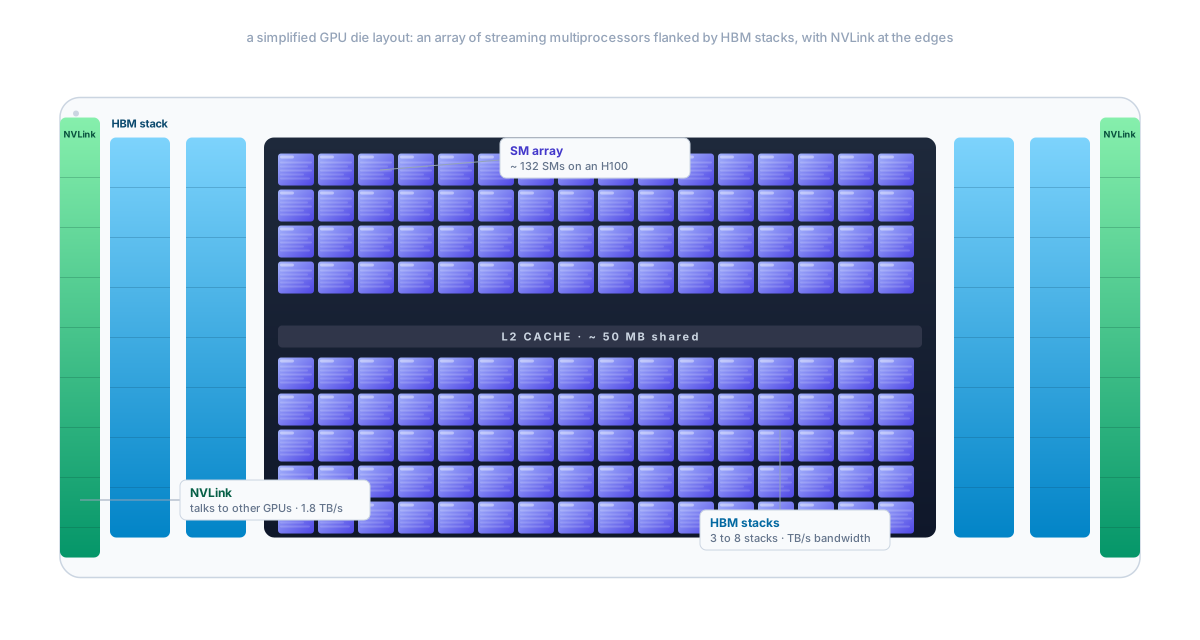
Around the SMs, you have the rest of the chip. There is a big shared cache (the L2). There is a memory controller that talks to the HBM, the high-speed memory chips sitting next to the GPU die. There are interconnects (NVLink) for talking to other GPUs. There is a host interface that talks to the CPU through PCIe.
But the SMs are where the actual work happens. Everything else is plumbing.
Inside one SM
Open up one SM and you find four sub-units. Each sub-unit has:
- Some CUDA cores, the small math units that do simple operations like multiply and add.
- One or more tensor cores, the specialized matrix math units. We will get to these.
- A warp scheduler that decides which group of threads runs each cycle.
- A register file, a small block of fast memory where threads keep their local variables.
- A small bit of shared memory that all threads in this SM can access.
The numbers vary by generation, but on an H100 SM, you have 128 CUDA cores split across the four sub-units, plus 4 tensor cores. Across the whole H100 chip, that is CUDA cores and tensor cores. These are the numbers you sometimes see in marketing material.
Each CUDA core is small. It does basic arithmetic on 32-bit floats, plus some lower-precision modes. It is nothing like a CPU core. There is no branch predictor, no out-of-order execution, no fancy tricks. A CUDA core is closer to a single math lane in a vector unit than to a real processor.
The smart parts of the SM are the warp scheduler and the memory pipeline. Those are what make the chip work fast despite each individual core being simple.
Threads, warps, and blocks: the hierarchy of work
Now to the part that confuses most people the first time they hear it: how work is organized on a GPU.
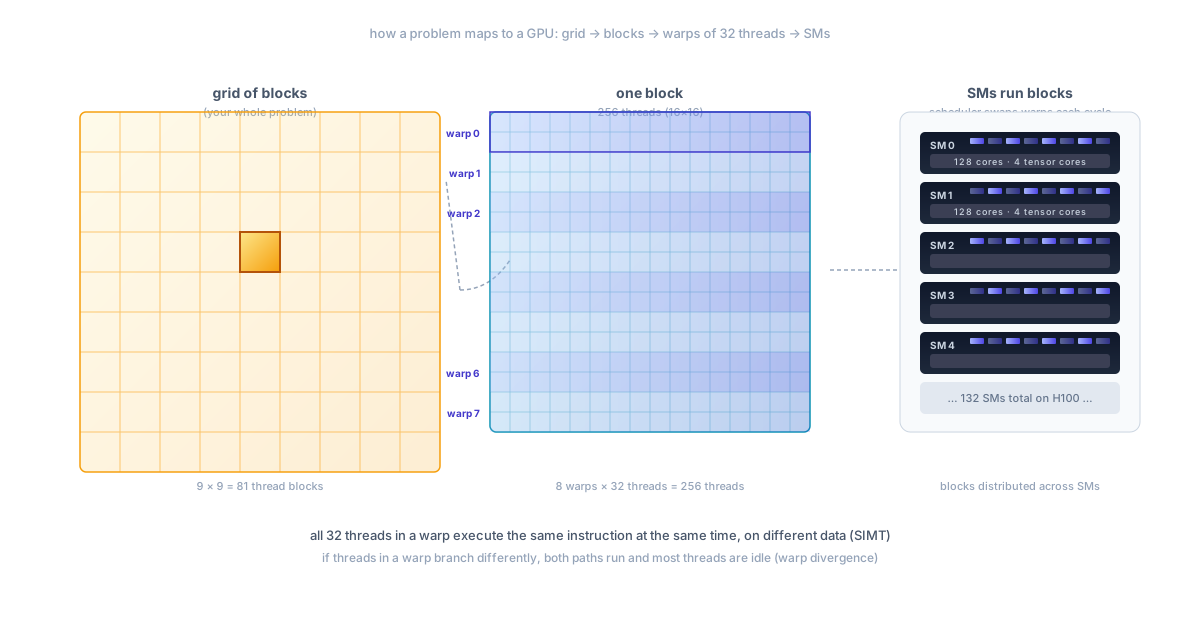
When you write a CUDA program, you describe the work as a grid of thread blocks, and each thread block has many threads. A thread is the smallest unit of work. A block is a group of threads that can talk to each other through shared memory. A grid is the whole problem you are running.
Suppose you want to multiply two matrices. You might write the code so that each thread computes one cell of the output matrix. That is over a million threads. You might organize them into thread blocks of threads each, giving you thread blocks total.
The GPU schedules these blocks onto the SMs. Each SM can hold multiple blocks at once. As blocks finish, new ones get loaded. The thousands of CUDA cores in the GPU work through the millions of threads in the grid, and you eventually have your output matrix.
So far this looks like normal multi-threaded programming. The trick comes one layer down.
Inside an SM, threads are not scheduled one at a time. They are grouped into bundles of 32, called warps. All 32 threads in a warp execute the same instruction at the same time, on different data. This is called SIMT (Single Instruction, Multiple Threads). It is a relative of the SIMD model in CPU vector units, but slightly more flexible.
What does this mean in practice? It means that if you have 32 threads in a warp and they are all running the same code, you get full parallelism. If they branch differently (some take the if path, some take the else path), the SM has to run both paths and mask the threads that should not be active. This is called warp divergence, and it slows things down.
For matrix multiplication, this is fine. Every thread is doing the same dot product with different inputs. There is no divergence. The SIMT model fits the work perfectly.
For branchy code, like a tree traversal or a parser, the SIMT model is brutal. The GPU spends most of its time running paths that some threads do not need. This is the deeper reason GPUs are bad at general-purpose code: the hardware assumes everyone is doing the same thing, and punishes you when they are not.
The warp scheduler trick
Here is something that surprised me when I first learned it. The warp scheduler in an SM does not just run one warp at a time. It runs many warps "concurrently" by switching between them very fast.
The reason is memory. When a warp asks for data from main memory, the data takes a few hundred cycles to arrive. If the SM stalled and waited, it would be idle for most of the time. Instead, the scheduler swaps in another warp that has data ready, runs it for a few cycles, and switches again.
This is similar to how an operating system switches between threads on a CPU, except it happens at the hardware level and is much faster. The SM might have 64 warps in flight at any given moment, and the scheduler picks whichever one is ready to make progress each cycle.
This is why GPUs need so many threads to be efficient. If you only launch a few thousand threads, the scheduler runs out of warps to switch to, and the SM stalls waiting on memory. To "saturate" a GPU, you typically need to launch hundreds of thousands of threads, way more than the number of cores. This sounds wasteful but it is how the GPU hides memory latency.
For AI, this is rarely a problem. A single layer of a transformer is already millions of operations. There is plenty of work to keep the SMs busy.
Memory: the part most engineers underestimate
People talk about GPUs in terms of compute (how many TFLOPS, how many cores). But for AI, memory is often the bottleneck. Specifically, the speed at which you can move data between memory and the compute units.
A GPU has multiple kinds of memory, each with different speeds, sizes, and rules. From fastest to slowest:
- Registers. Each thread has its own private registers. Access takes one cycle. The register file in an SM is around 256 KB total, split across all the threads running on that SM.
- Shared memory. A small block of memory shared by all threads in a thread block. Access takes a few cycles. Around 100 to 228 KB per SM, depending on the chip.
- L1 cache. A small per-SM cache for recently used data from main memory. On modern NVIDIA GPUs, the L1 and shared memory share the same hardware and can be configured.
- L2 cache. A larger cache shared by all SMs. Around 50 MB on an H100. Slower than L1 but bigger.
- HBM (high-bandwidth memory). The main GPU memory. The H100 has 80 GB of HBM3, the H200 has 141 GB of HBM3e, the B200 has 192 GB. This is what people mean when they say a GPU has "X gigabytes of memory."
Each level is bigger and slower than the one above. The numbers are striking. Registers can deliver tens of TB per second of bandwidth per SM. HBM, the main memory, delivers around 3 TB/s on an H100, total. That sounds fast (and it is, compared to a CPU's main memory at maybe 80 GB/s), but it is much slower than the compute units can consume.
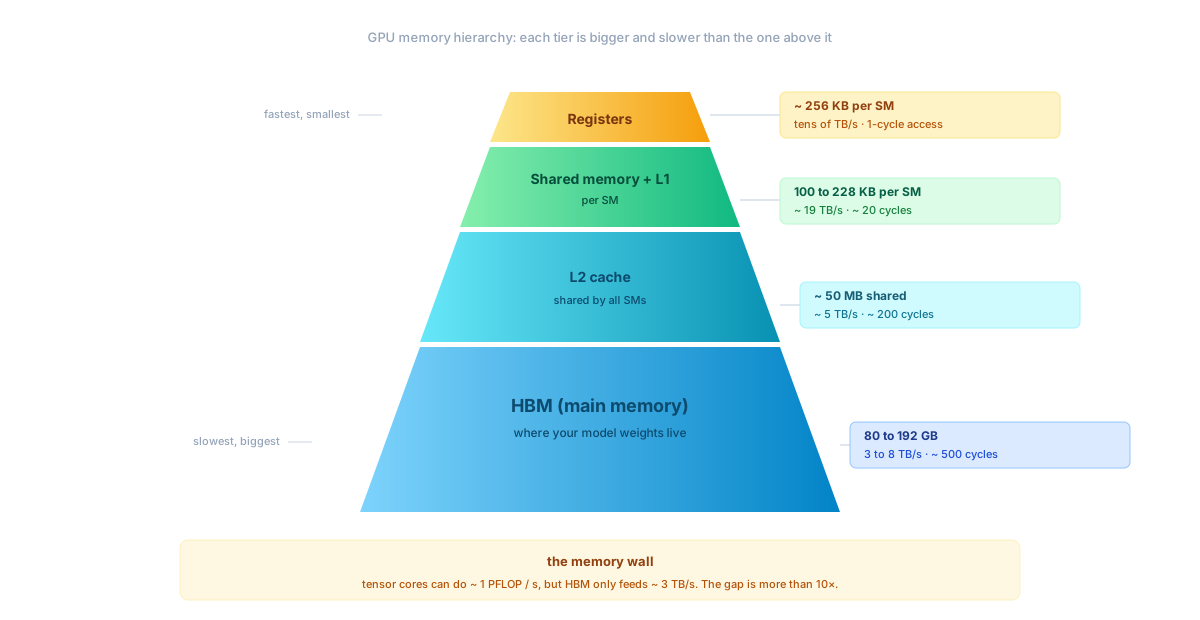
This gap between compute speed and memory speed is the memory wall. The H100 can do around 1 petaflop of dense FP16 compute per second on its tensor cores. To feed those tensor cores with new data every cycle, you would need memory bandwidth in the order of 50 to 100 TB/s. The HBM gives you 3 TB/s. The gap is more than 10x.
This is not a flaw in the chip. It is a fundamental limit. Memory bandwidth scales with the perimeter of the die (where the memory wires come in) and with how many memory channels you can fit. Compute scales with the area of the die (where the cores live). Area grows faster than perimeter as chips get bigger. Compute is racing ahead of memory, and has been for decades.
Why this matters for AI
The memory wall is why a lot of AI engineering is about avoiding memory traffic. If you have to load the same data from HBM 100 times, you are wasting most of your GPU. If you can load it once, keep it in cache or shared memory, and reuse it many times, you go much faster.
This is the heart of why matrix multiplication is so well suited to GPUs. When you multiply a matrix by another , every input cell gets reused 1024 times in different output cells. If you load the inputs into shared memory once and do all the math, your "arithmetic intensity" (operations per byte loaded) is high enough that compute, not memory, is the bottleneck.
Other operations are not so lucky. A simple element-wise add of two arrays loads two bytes and computes one operation, then loads two more bytes. The arithmetic intensity is too low to keep the compute units busy. The GPU is just moving data around. These operations are called memory-bound, and they run at the speed of HBM, not the speed of the cores.
A lot of practical performance engineering for AI is about turning memory-bound operations into compute-bound ones. Fusing layers together so you load data once and do many ops on it. Carefully arranging matrix multiplies so they reuse data well. Picking the right batch size so the GPU is busy. Once you understand the memory wall, half of the tricks in AI infrastructure make sense.
Tensor cores: the matrix multiply in hardware
Up to now I have been describing how regular CUDA cores work. But there is one more piece of the SM that is critical for AI: the tensor core.
A CUDA core does scalar math. It multiplies one number by another number. To compute a matrix multiply, you would need 64 multiplies and 48 adds on regular CUDA cores, taking many cycles.
A tensor core is a small unit that does an entire matrix multiply (with accumulation) in one operation. It takes two matrices, multiplies them, and adds the result to a third matrix. NVIDIA calls this MMA (matrix multiply-accumulate). One tensor core does many tens of operations per cycle.
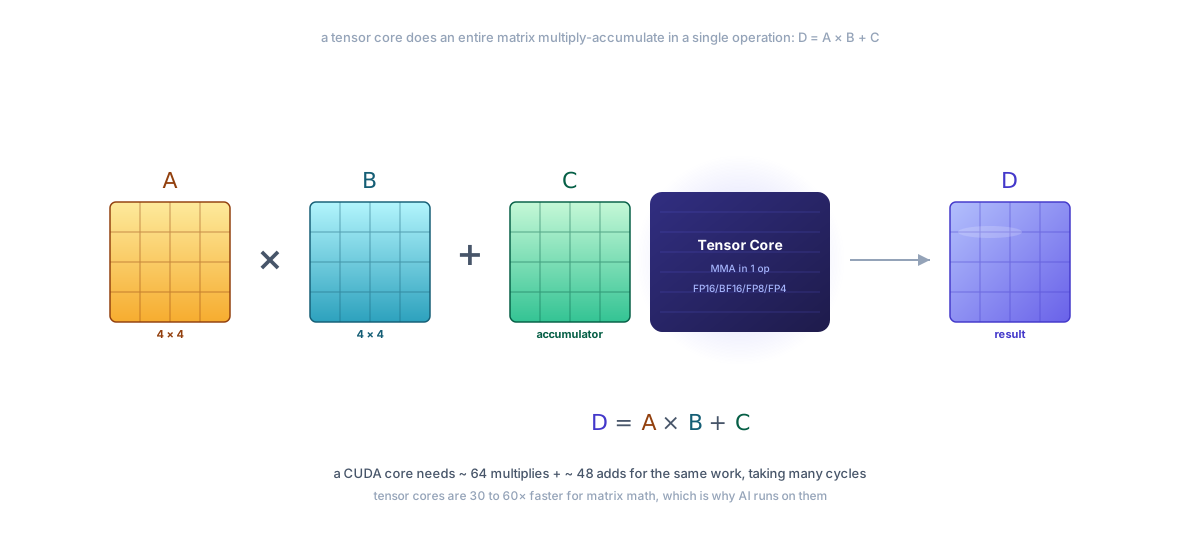
Modern tensor cores have grown. The Hopper-generation tensor cores in the H100 work on much larger blocks per cycle and support many number formats: FP32, FP16, BF16, FP8, INT8, INT4. The Blackwell-generation tensor cores in the B200 even support FP4. Lower precision means less memory traffic and more operations per cycle.
This is why you hear about FP16 and FP8 in AI. Modern training runs use a mix of precisions: some layers in BF16 or FP8 for speed, some in FP32 for stability. The tensor cores accelerate the lower-precision matrix math, while the model's overall accuracy is preserved through careful mixed-precision training. We will see more of this in Part 3.
For practical numbers: an H100 has 4 tensor cores per SM and 132 SMs, running at around 1.8 GHz boost. Together they deliver a peak of around 1 PFLOPS in dense BF16, or about 2 PFLOPS in FP8. The CUDA cores, by comparison, top out around 67 TFLOPS in FP32. So tensor cores are 30 to 60 times faster than CUDA cores for the math they do, depending on the precision. This is why people say "AI runs on tensor cores," not "AI runs on CUDA cores." The CUDA cores still do plenty of work (activations, normalization, parts of attention, gradient updates), but the tensor cores do most of the heavy lifting.
A kernel: how code actually runs on a GPU
Let me try to make this concrete. Here is a sketch of what running a single AI operation on a GPU looks like, in steps.
You have a model. The current step is, say, multiplying an input matrix (the activations from the previous layer) by a weight matrix .
- The CPU launches a kernel. A kernel is a function that runs on the GPU. The CPU calls something like
matmul(X, W, Y), which under the hood asks CUDA to launch a grid of thread blocks. Each block handles a tile (a small chunk) of the output matrix. - The blocks get scheduled on SMs. The GPU's scheduler distributes blocks across the available SMs. If you have 4096 blocks and 132 SMs, each SM eventually runs about 31 blocks (often several at a time).
- Inside each block, the threads cooperate. They load tiles of and from HBM into shared memory. This is the slow part. They use shared memory because every thread in the block needs access to those tiles, and shared memory is much faster than HBM.
- The threads call tensor core operations. They tell the tensor cores: take this tile of from shared memory, multiply by this tile of , accumulate into our output. The tensor cores do the math in a few cycles. The threads then move to the next tile.
- The output gets written back to HBM. Once the block has computed its tile of , the result is written from shared memory back to HBM.
- The kernel finishes. The CPU is told the kernel is done, or it queues the next kernel right behind it.
This pattern, "load a tile, compute, store a tile," is repeated for every layer of every neural network. A modern training step might be hundreds of kernels chained together, each doing a piece of the math: matrix multiplies, attention, normalizations, activations, gradient updates.
In practice, you do not write CUDA kernels by hand for AI work. You use a higher-level framework (PyTorch, JAX, TensorFlow) that calls into NVIDIA's libraries (cuBLAS, cuDNN) which contain hand-tuned kernels for every common operation. The libraries are how NVIDIA's software moat shows up: they are very fast, and re-creating them for another vendor's hardware is years of work.
For AI engineers, the practical implication is that picking the right kernel matters. Library updates that make matrix multiply 20% faster are a big deal. Frameworks like PyTorch 2.0 (with torch.compile) and the flash-attention library exist specifically to use the GPU better. Half of the speedups you see in AI papers from year to year are not algorithmic improvements but better use of the same hardware.
What an AI engineer should remember
You do not need to write CUDA to use a GPU well, but you should have a working mental model. Here is what to carry forward.
The first is the structure: a GPU is many SMs, each with many simple cores plus tensor cores, shared memory, and a scheduler. Work is split into a grid of thread blocks, and blocks run on SMs as they become free.
The second is the threading model: threads are grouped into warps of 32 that run in lockstep. This is great for uniform work like matrix math and bad for branchy code. AI is uniform, so the model fits.
The third is the memory wall: the gap between how fast the cores can do math and how fast memory can feed them is huge and growing. Tensor cores make this worse, not better, because they do more math per cycle. A lot of AI performance work is about making sure memory is not the bottleneck.
The fourth is tensor cores: they do matrix multiplies in hardware, and they are 30 to 60 times faster than regular CUDA cores for AI math. Modern AI training and inference is mostly tensor core work, with the rest of the chip handling everything else.
Once you have these four ideas, you can read NVIDIA's docs, follow performance discussions, and reason about why a workload is fast or slow.
What is next
Part 3 goes up the stack. One GPU is impressive, but training a frontier model needs thousands of them, all working together, all sharing data. We will look at the H100, H200, B200, and B300, the family of chips currently used in production. We will see how NVLink and NVSwitch connect them into a single big "supercomputer" called NVL72. We will look at HBM, the high-bandwidth memory that everyone is fighting over. And we will look at the alternatives: TPUs, AMD MI300X, Cerebras, Groq, and the custom silicon coming from Amazon, Google, and others.
The story of AI compute does not end with "use a GPU." It ends with "use 100,000 GPUs, connected with insanely fast networks, drawing tens of megawatts of power, in a cluster the size of a building." That is what we will look at next.
See you in Part 3.