

If you are a software engineer in 2026, you have probably noticed that the word "AI" is everywhere. Your CEO is talking about it. Job postings ask for it. Friends ask you what they should learn. The marketing keeps getting louder. The actual content under the marketing keeps getting thinner.
I have been in software for 20+ years and using LLMs daily for 2+ years. This post is the map I wish someone had given me when I started. No hype. No "transforming the future of everything." Just what AI actually is right now, what it can and cannot do, and what you should do about it if you are a tech professional who wants to move toward AI work.
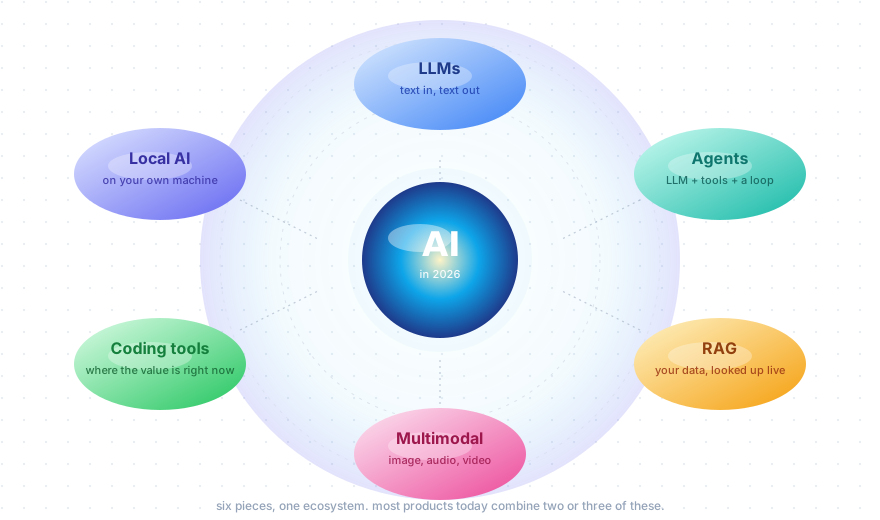
It is long. The reason is that "AI" is not one thing. It is a small ecosystem of pieces that fit together. If you understand the pieces, the rest of the field stops being scary and starts being interesting.
Let me start.
What "AI" actually means in 2026
The word AI has been around since 1956. It has meant many things over the years: rule-based systems, expert systems, computer vision, robotics, recommendation engines. All of those are still valid AI. None of them is what people mean today.
When somebody says "AI" in 2026, they almost always mean a Large Language Model, also known as an LLM, or a product built on top of one. Claude, ChatGPT, Gemini, Llama, Qwen, DeepSeek. These are the things that took over.
Everything else in this post (agents, RAG, multimodal, coding tools, local AI) is built on top of LLMs. So the foundation is the LLM. If you understand that one piece well, everything else is easier.
LLMs: what they actually do
An LLM is a program that does one thing very well: given some text, predict what text should come next.
That is it. The whole "magic" of LLMs is built on top of next-token prediction. You type "the capital of France is", the model predicts "Paris" as the most likely next piece of text. You type "write me a Python function that adds two numbers", the model predicts what such a function looks like, one piece at a time.
The reason this is useful is that the model has read most of the public internet. Books, papers, code, blog posts, Wikipedia, forum discussions, documentation. Hundreds of billions of words. From all that reading, the model picked up patterns: how English sentences flow, how Python code is structured, how customer support emails look, how lawyers write contracts, how doctors write notes. Everything.
So when you give it a question, it does not "know" the answer the way you and I know things. It generates the answer that, statistically, looks the most like what should come next based on the patterns it has seen.
This is important because it shapes both what LLMs are good at and what they are bad at.
LLMs are good at:
- Reading text and understanding what it means
- Writing text in any style or format
- Translating between languages
- Writing code (because code is just text with strict patterns)
- Following long, detailed instructions
- Classifying things ("is this email spam?")
- Summarizing long documents
- Pulling structured data out of messy text
LLMs are bad at:
- Math that requires actual calculation. They guess patterns, not numbers
- Being consistent. Same question, slightly different answers each time
- Remembering things between conversations. Each chat is fresh
- Knowing what is true. They generate plausible-sounding text. Plausible is not the same as true
- Doing anything in the real world. By default, an LLM cannot click a button, send an email, or read a file. It only generates text
Most of the products you see (RAG systems, agents, coding tools) exist to work around the second list while keeping the strengths of the first.
Tokens: what the model actually reads
The model does not read words. It reads tokens.
A token is a small piece of text. Sometimes it is a full word, sometimes it is a piece of a word, sometimes it is just punctuation. Short common words like "the" or "is" are usually one token. Longer or rarer words get split into pieces.
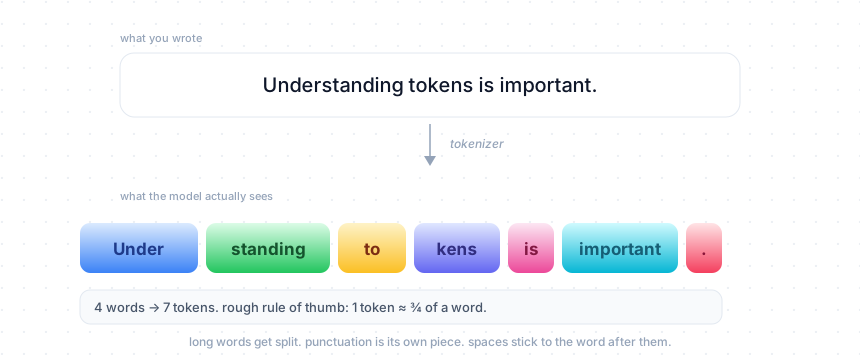
A rough rule of thumb: 1 token is about 3/4 of a word. 1,000 tokens is about 750 words of English. Code is denser, so a thousand tokens of Python is fewer "lines" than you would expect.
Why should you care about tokens?
Two reasons. First, you pay per token. Both the tokens you send (input) and the tokens the model writes back (output). If you send a long document and ask for a long summary, that is a lot of tokens both ways. Second, the model has a limit on how many tokens it can handle at once. That limit is called the context window.
Tokens also matter for non-English text. Languages like Tamil, Hindi, or Arabic often need more tokens per word than English does, because the tokenizer was trained mostly on English text. So the same sentence in Tamil might cost 3 to 5 times more than in English. Newer tokenizers are better at this, but the gap is still real.
The context window: working memory
The context window is the amount of text the model can hold in its head at one time. It includes everything: the system prompt, the chat history, any documents you sent, the user question, and the answer the model writes.
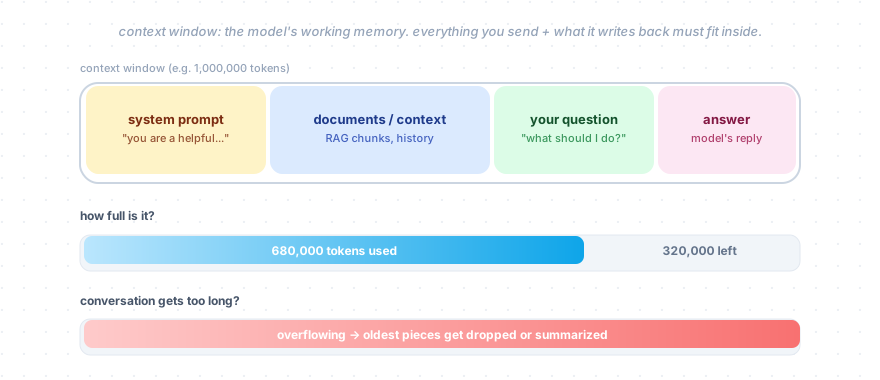
Two years ago, most models had context windows of 8,000 to 32,000 tokens. Today the top models handle 1 million tokens, which is about 750,000 English words, or roughly 2,500 pages of plain text. Meta's Llama 4 Scout pushes this to 10 million tokens, which is wild but rarely needed in practice.
When the context fills up, things get dropped. The exact behavior depends on the product. Some chat tools simply forget the oldest messages. Others summarize old parts of the conversation to make room for new content. Anthropic calls this context compaction and it works pretty well in long Claude Code sessions.
A practical mental model: think of the context window as a small whiteboard. The model can read everything on the whiteboard before answering. If you want it to know something, it has to be on the whiteboard. If you erase something, the model forgets it. There is no other memory.
This is why "the AI forgot what we talked about earlier" happens. It did not forget. The earlier text just rolled off the edge of the whiteboard.
Embeddings: turning meaning into numbers
This is the second important idea after tokens. Once you understand embeddings, RAG, semantic search, and a lot of vector database stuff start to make sense.
An embedding takes a piece of text (a word, a sentence, a paragraph) and converts it to a long list of numbers. Something like 1,536 numbers for OpenAI's embedding model, or 768 for many open ones. The numbers do not mean anything to a human. To math, they mean a position in a giant multidimensional space.
The interesting part is what gets organized in that space. Pieces of text that mean the same thing end up close to each other. Pieces of text that mean different things end up far apart.
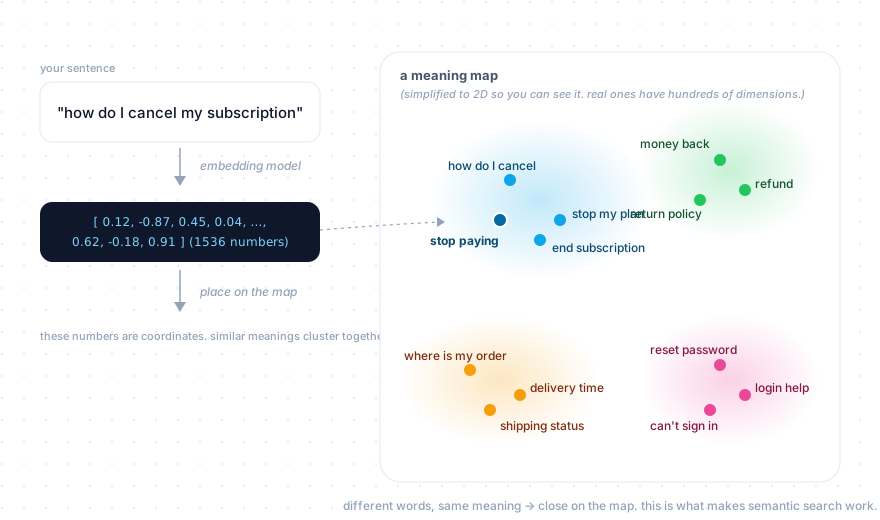
For example: "how do I cancel my subscription" and "I want to stop paying" use almost no shared words. To a keyword search, they look unrelated. To embeddings, they end up right next to each other on the meaning map. Both are about ending a paid plan.
This is what makes semantic search possible. You search by meaning, not by keywords. A user can ask "my router is broken" and find a help article titled "troubleshooting Wi-Fi connectivity issues" even though zero words match.
The way you use embeddings in practice is simple:
- Take all your text and convert each chunk into an embedding (numbers).
- Store those numbers in a database that is good at finding nearest neighbors. These are called vector databases. Pinecone, Weaviate, Qdrant, Milvus, pgvector are common ones.
- When a user asks something, convert their question into an embedding too.
- Find the chunks whose embeddings are closest to the question's embedding.
- Those are your search results.
That is the whole pipeline. The next section uses it.
RAG: giving the LLM access to your data
Here is a problem you will hit very quickly. You build a chatbot for your company. A customer asks "what's your refund policy?" The LLM does not know. It was trained on the public internet, not your internal docs. It will either invent something (this is called a hallucination and it is a real problem) or politely say it does not know.
The fix is called RAG, which stands for Retrieval-Augmented Generation. The name is fancy. The idea is dead simple.
Before asking the LLM the question, search your own documents, find the relevant pieces, and stick them into the prompt as context. The LLM does not "learn" your data. It just reads the relevant chunks at the moment of answering.
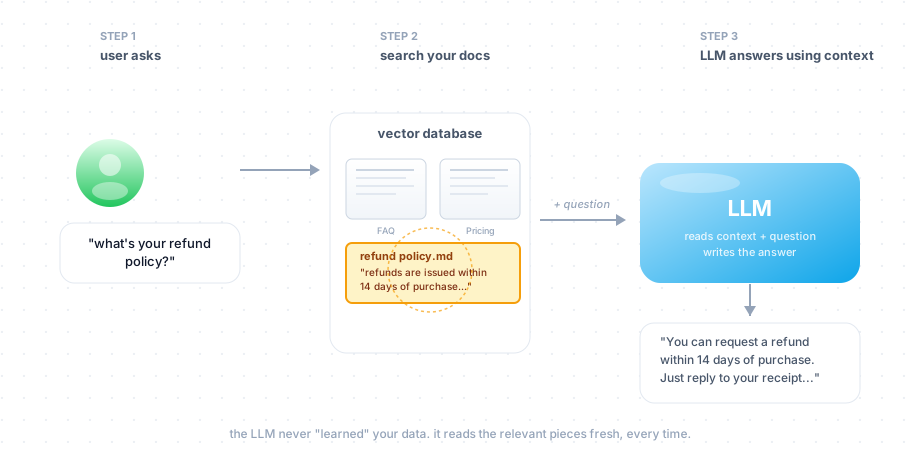
Here is the flow with a concrete example:
- User asks: "what's your refund policy?"
- Your system converts the question into an embedding.
- It searches your vector database (which has all your help docs as embeddings) and finds the chunk that says "refunds are issued within 14 days of purchase..."
- Your system builds a prompt like:
You are a helpful support agent for Acme Corp.

Use only the following context to answer the customer's question.
If the answer isn't in the context, say you don't know.

Context:
"Refunds are issued within 14 days of purchase.
Customers can request refunds by replying to the
purchase receipt email..."

Question: what's your refund policy?
- The LLM reads the prompt and answers using the context. The answer is grounded in your actual policy.
Almost every "chat with your docs" product you have ever seen works this way. There is no fine-tuning. No retraining. Just search plus prompting.
The basic version above will get you 80% of the way. There are fancier variants you will hear about: hybrid search (combine semantic search with keyword search, because keywords are still important for things like product codes or exact phrases), reranking (use a separate model to reorder the top results), agentic RAG (let the LLM decide what to search for based on the conversation), and graph RAG (build a knowledge graph and traverse it). All of these are improvements on top of the basic flow. None of them changes the core idea.
A pattern I want you to notice: the LLM never owns your data. Each request looks the data up fresh. This is why RAG is good for facts that change. You update the docs, you re-index them, the next query uses the new info immediately. No retraining needed.
"Can I just train it on my data?"
This is the most common question I get from people new to AI. Almost always, the answer is "you do not actually want to do that, and here is why."
When someone says "train the model on my data" they usually mean one of three things, and only the first two are normally what you want.
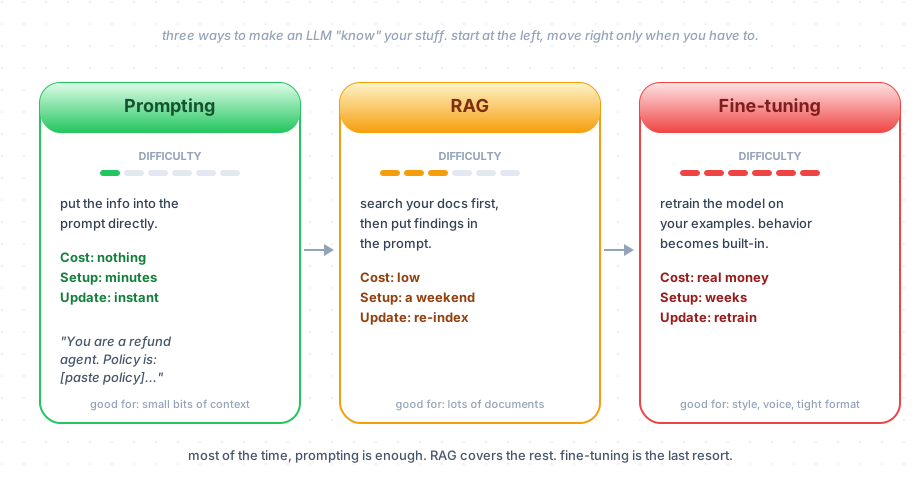
Path 1: Prompting. Put the info into the prompt directly. "You are a refund agent for Acme. Our policy is: [paste policy]. Answer the customer's question." Costs nothing. Works in minutes. Updates instantly. With million-token context windows, you can fit a lot of information into a single prompt. For most use cases, this is the right answer and it is embarrassing how often people skip it.
Path 2: RAG. When you have too many documents to fit in a single prompt, use RAG. Search first, then inject the relevant chunks. This handles all the "chat with our knowledge base" scenarios. It is the next step up.
Path 3: Fine-tuning. Take a base model and continue training it on your own examples (input and expected output pairs). This actually changes the model's weights. The new behavior gets baked in. After fine-tuning, the model does what you taught it without needing the same instructions in the prompt.
Fine-tuning sounds great. It is also the most expensive, slowest, and most fragile option. You need thousands of high-quality training examples. You need to evaluate the result carefully because the model can get worse at general tasks while getting better at your specific one. You need to redo it whenever your data changes meaningfully. And it is bad at adding facts. If you fine-tune on company docs, the model picks up your writing style but does not reliably memorize your prices or policies.
When does fine-tuning make sense? When you need a very consistent style (every output in your exact tone), a very strict format (every response has to follow your exact JSON shape), or a specialized domain (medical, legal, financial language) that the base model handles awkwardly. These are real cases. They are just much rarer than people think.
The right order is: prompt first, RAG when needed, fine-tune as a last resort. Most people I have seen go straight to fine-tuning, spend three months on it, and end up with something a 200-token system prompt would have done better.
Agents: LLMs that can do things
So far everything has been text in, text out. That is the LLM by itself. An agent gives the LLM access to tools so it can actually do things in the world.
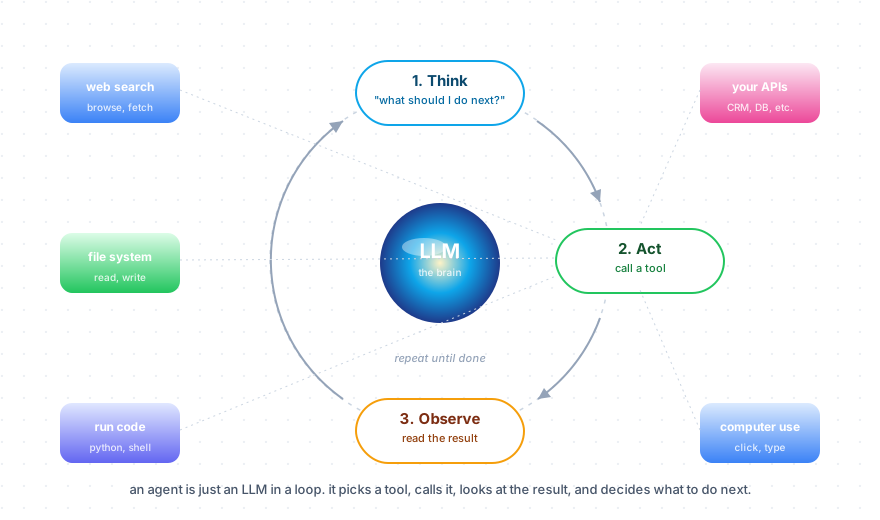
The shape is always the same:
- Think. The LLM looks at the goal and decides what to do next.
- Act. The LLM picks a tool and calls it. Search the web. Read a file. Run a Python script. Hit your CRM. Click a button on a webpage.
- Observe. The result of that tool call goes back into the context window.
- Repeat. The LLM looks at the new state and decides what to do next.
This loop continues until the LLM thinks the task is done, or hits a step limit, or fails.
Concrete example: you ask an agent "find our top 5 competitors and compare their pricing to ours." A reasonable agent will search the web for competitor names, visit their pricing pages, read your own pricing doc from a file, and write a comparison table. You did not give it those steps. It figured them out from the goal.
The big agent products and frameworks today:
- Claude Code and OpenAI Codex are coding agents you actually use as tools today.
- Claude Agent SDK lets you build the same kind of agent for your own use case.
- OpenAI Agents SDK is good if you want multiple agents handing off work to each other, but it ties you to OpenAI.
- LangGraph is the most flexible framework. It is what most production teams settle on once they need real workflows.
- CrewAI is good for fast prototyping.
A separate but important thing: MCP, the Model Context Protocol. This is a standard way for agents to talk to tools. You build a tool once, expose it as an MCP server, and any MCP-aware client (Claude Code, Cursor, ChatGPT desktop, etc.) can use it. Anthropic started it, but OpenAI, Google, Microsoft, and AWS all support it now. If you build agent tools, MCP is the standard. Do not invent your own.
The honest truth about agents: they are slow, expensive, and often frustrating to debug. The model wanders off, picks the wrong tool, gets stuck in loops. Agents are great for open-ended research and investigation where the steps cannot be planned in advance. For most other things, a fixed pipeline (do X, then call the LLM, then do Y) is faster, cheaper, and much easier to operate. People love agents because they are exciting. Most production systems should not use them.
Reasoning models: a new shift
This is the newest big change. In late 2024 a different kind of model started showing up. They are called reasoning models, or sometimes "thinking models." OpenAI's o-series, Anthropic's "extended thinking" mode, DeepSeek R1, Gemini Thinking, Qwen QwQ.
The idea is simple. Before answering, the model writes out its own reasoning. A long chain of internal "thoughts" you do not see (or sometimes you do, depending on the product). It catches its own mistakes, considers alternatives, and only then commits to an answer.
This burns more tokens. It is slower. It is more expensive. In return, you get much better answers on hard problems: tricky math, complex code, multi-step planning. On easy problems, the reasoning is wasted effort.
Most modern products mix both. A non-reasoning model handles simple stuff fast. A reasoning model gets called when the question is hard. Some models (like Claude Opus 4) let you turn thinking on or off per request, with a "thinking budget" you can set. So you control the tradeoff.
If you have not played with one of these, do it. Pick a hard problem you have. Run it through GPT-5 Thinking or Claude Opus 4 with extended thinking turned on. The difference compared to a non-reasoning model is real.
Multimodal: text, images, audio, video
For a long time, "AI model" meant a model that takes text and produces text. That changed.
Today's top models are multimodal by default. You can drop a photo, a screenshot, a chart, a PDF, or even short video into Claude, GPT, or Gemini, and ask questions about it. No special setup needed.
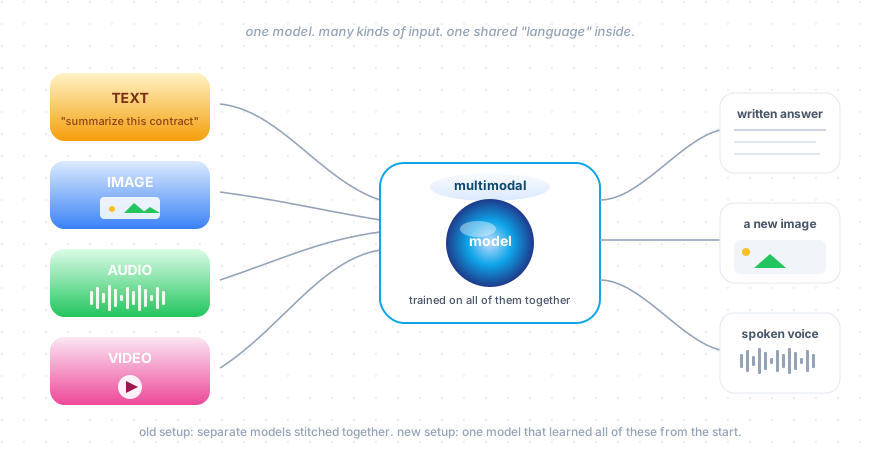
The technical shift here matters. Old multimodal systems used to be text models with a vision model bolted on top. The two were separate, and they spoke a translator language between them. Modern multimodal models are trained on text, images, audio, and video together from the very start. This is sometimes called "early fusion." The result is that the model can actually reason across what it sees and reads, in one head.
Concrete things this enables:
- A customer photographs a broken router. The AI looks at the photo, identifies the model, and walks them through fixing it.
- A factory line camera watches products go by. The model spots defects without anyone writing rules for what a defect looks like.
- A nurse opens a video call with a patient. The AI listens to the conversation, watches the patient, and helps with triage notes.
- You drop a 50-page PDF into Claude. It reads the whole thing including the charts and tables and gives you the summary you wanted.
For audio, OpenAI's voice mode does real-time conversation that feels close to a phone call. Gemini does live translation while keeping the speaker's tone. Claude does not have native audio yet, which is a noticeable gap.
For generation, AI now creates images and video too. GPT Image 1.5 is built into the language model so you refine images through chat. Midjourney v7 is the most artistic. Google's Imagen 4 is the most photorealistic. For video, Sora 2 and Veo 3 produce 4K footage with audio. Two years ago video gen was a research demo. Today it is in real products.
The pattern to notice: multimodal is not a feature you need to opt into anymore. It is the default. If you build something on a current model, it can already handle images and PDFs.
Local AI: running models on your own machine
Not everything has to go through an API. Some models are open-weights, which means the model file is published and you can download it and run it yourself. The big names today are DeepSeek V3.2, Llama 4, Qwen 3.5, and Mistral 3.
The catch is that the full-size open-weights models that compete with cloud APIs have hundreds of billions of parameters. You are not running those on your laptop. What people actually run locally are smaller versions of these models, usually 7B to 32B parameters.
Two tools to know:
- Ollama: command-line, very easy. Like Docker but for models.
ollama run llama3and you have a model running. - LM Studio: desktop app with a model browser. Easier if you do not like the terminal.
Both use llama.cpp under the hood, so performance is similar.
Hardware matters a lot here. The model has to fit in your GPU memory (VRAM), or in unified memory on Apple Silicon Macs. There is a trick called quantization that compresses the model weights from 16-bit numbers to 4-bit numbers. This cuts memory use by about 75% with a small drop in quality. A 7B model goes from about 14GB to 4GB after quantization. A 70B model goes from 140GB to about 40GB.
Rough numbers for what runs where:
- NVIDIA RTX 3060 (12GB): 7B models fine. 13B with effort.
- NVIDIA RTX 4090 (24GB): Up to 32B at 4-bit. 100+ tokens/sec on a 7B. Very usable.
- NVIDIA RTX 5090 (32GB) or multiple GPUs: 70B models.
- MacBook Pro M4 with 48GB unified memory: A 32B quantized model fits comfortably.
- Mac Studio M4 Max with 128GB: Up to 70B, slower (15 to 30 tokens/sec).
- CPU only: Possible but very slow. Only usable for tiny 3B-or-smaller models.
When does local AI make sense?
- Privacy. Data never leaves your machine. Real for regulated industries, sensitive client work, or just paranoia.
- Offline. Trains, planes, places without good internet.
- Cost at scale. If you are doing millions of LLM calls per day on simple tasks, paying per token gets expensive. Running your own can be cheaper.
- Learning. Spinning up a local model and poking at it is the fastest way to understand how the parameters work.
When does local AI not make sense? When you need top-of-the-line quality. A locally hosted 14B model is roughly where the best cloud models were two years ago. Good enough for many things, not in the same league as Claude Opus or GPT-5 for hard tasks.
AI coding tools: where the real value is
If I had to pick one area where AI is delivering measurable value to working professionals today, it is coding tools. Three tiers:
Inline assistants. GitHub Copilot is the OG. Auto-complete on steroids. You write a few lines, it suggests the rest. Widest adoption.
IDE-integrated agents. Cursor, Windsurf, Google's Antigravity. Your editor with an agent inside it. You chat with it, point at files, ask it to make changes. It reads your code, edits files, runs tests. This is where most of my day-to-day coding happens now.
Autonomous agents. Claude Code, OpenAI Codex, AWS Kiro. You give it a task and it goes off and does it across multiple files, runs tests, opens a PR. You review the diff. Less fast feedback loop than the IDE-integrated tools, more useful for bigger changes.
The reality of these tools, after using them daily for two years:
- They make experienced engineers significantly faster on routine work.
- They are bad at replacing judgment. The model writes confident-looking code that does the wrong thing more often than people admit.
- The best workflow is review every diff. Treat the agent as a junior engineer who is fast but does not understand your system the way you do.
- The biggest skill is no longer typing. It is being able to describe what you want, read a diff carefully, and catch the weird parts.
If you are a working software engineer and you are not using at least one of these tools daily, that is the easiest single change you can make.
The current model landscape
Now that you have the vocabulary, here is where the major models stand as of April 2026:
| Model | Provider | Context | Strong at |
|---|---|---|---|
| Claude Opus 4.6 | Anthropic | 1M | Long agentic tasks, coding, extended thinking |
| Claude Sonnet 4.6 | Anthropic | 1M | Balanced, fast, default workhorse |
| Claude Haiku 4.5 | Anthropic | 200K | Cheapest, fast, good for high-volume work |
| GPT-5.4 Thinking | OpenAI | 1M | Math, reasoning, computer use |
| GPT-5 mini | OpenAI | 400K | Cheap and fast |
| Gemini 3.1 Pro | 1M | Multimodal, very long contexts, search-grounded | |
| Llama 4 Maverick | Meta | 1M | Open weights, multimodal |
| Llama 4 Scout | Meta | 10M | Largest context window |
| DeepSeek V3.2 | DeepSeek | 128K | Open weights, very strong reasoning, very cheap |
| Qwen 3.5 | Alibaba | 256K | Open weights, strong multilingual |
A few things to notice:
- Context windows have exploded. Three years ago, 8K was normal. Today 1M is normal.
- Open-weights have caught up. DeepSeek and Qwen are competitive with the closed-source frontier on many benchmarks, at a fraction of the cost.
- Pricing keeps falling. A million input tokens to Claude Haiku or GPT-5 mini costs about 20. Top-tier models cost a few dollars per million tokens. Cost stopped being a serious blocker for most use cases.
What is real and what is noise
After all this, here is my honest read on what is delivering value and what is mostly hype.
What is real:
- Coding tools, as covered above. Real productivity gain for engineers.
- RAG-based search and Q&A over private knowledge bases, when scoped properly.
- Document processing pipelines (extract this from invoices, classify this email, summarize this contract). Boring but high value.
- Personal productivity. Using an LLM for writing, analysis, research, brainstorming, with you reading carefully. Real value for almost everyone who tries it seriously.
- Customer support that combines RAG with LLMs, when there is a human handoff for the hard cases.
- Translation and multilingual content. The quality is just good now.
What is overhyped:
- "AGI by next year." This phrase has been said every year since 2022. Still not here.
- Fully autonomous AI employees replacing entire teams. Not happening at scale, despite the demos.
- Most enterprise AI initiatives. Lots of money spent. Hard to find clear ROI most of the time.
- Agents for general-purpose work. Cool demos. Slow, expensive, fragile in production.
What is quietly important and worth watching:
- MCP becoming the standard way to connect tools to models.
- Reasoning models getting much better at hard problems.
- Open-weights models closing the gap with closed ones.
- Local AI becoming usable on consumer hardware.
- Multimodal models reaching real-time interaction.
How to actually move into AI as a software engineer
This is the section I wish someone had given me. If you are a working software engineer, you do not need to go back to school. You do not need a PhD in math. You do not need to learn how to train a model from scratch. The current AI economy has a massive demand for engineers who can build products on top of LLMs, and that is a skill you can pick up in weeks of focused work.
Here is the path I would take.
1. Pick one provider's API and use it. Claude or OpenAI. Both are good. Get an API key. Write a 20-line Python script that sends a message and prints the answer. Do this today, not next month. The single biggest barrier to learning AI is not starting.
2. Build something tiny that you actually use. A summarizer for the news you read. A bot that classifies emails. A script that turns your meeting notes into action items. The smaller the better. Something you can finish in a weekend. Use it for a week. Notice where it fails.
3. Get good at prompting. This is the most underrated skill. A well-crafted prompt with a system message, examples, and clear instructions replaces thousands of lines of code. Most production AI features are 200 lines of glue around 1 well-tested prompt.
4. Add RAG to one of your projects. Pick a small set of docs you care about (your company's wiki, your own notes, a book you like). Use OpenAI's embeddings API or a local embedding model. Use a simple vector database (pgvector if you already have Postgres, or Qdrant if you want something purpose-built). Build a chat-with-your-docs thing. You will learn more from this one project than from a month of reading.
5. Learn one agent framework, but don't start there. Once you have done the above, try LangGraph or the Claude Agent SDK. Build something with tools. Notice how much harder it is to debug than a simple pipeline. This is a healthy lesson.
6. Read code from real AI products. A lot of LLM apps are open source. Look at how they structure prompts, handle errors, do evaluation, manage tokens. The code is usually less mysterious than the marketing suggests.
7. Start writing about what you build. Even short notes. Blog posts. Internal write-ups. Doing this clarifies your own thinking, and it puts you in front of people who hire for AI work. Most AI hiring right now happens through visibility. People who are writing get the calls.
What you do not need to do early:
- You do not need to learn deep learning math first. Useful eventually, not required to ship products.
- You do not need to fine-tune anything for months. Almost nobody needs this.
- You do not need to understand transformer internals at the matrix-multiplication level. (A high-level mental model is good. The math can wait.)
- You do not need to switch jobs to start. Add an AI feature to whatever you are building today.
The AI field looks scary because of the hype. From inside, it is just engineering with one new building block. The block (the LLM) is unusual because it is non-deterministic and has its own opinions. But it is a building block. Software engineers are very good at composing building blocks. That is the job.
Where to go from here
If you came in feeling like AI was a giant impenetrable thing, I hope it feels smaller now. It is one big primitive (the LLM), one trick to give it your data (RAG), one trick to give it tools (agents), one new way to handle non-text inputs (multimodal), and one way to run it yourself (local AI). Everything else is a combination of these.
The rest is reading. A few specific posts on this site that go deeper:
- LLMs Explained, Part 1: How We Got Here walks through the 70-year history that led to today's LLMs.
- LLMs Explained, Part 2: How the Transformer Works explains the 2017 paper that started everything.
- How Much Should You Trust an LLM? is about hallucinations and why they happen.
- Automation vs LLM vs AI Agents covers when to use which.
The last advice I have, which I keep coming back to: build something this week. Reading about AI is fun. Building with AI is when you actually learn. The gap between someone who has used the API once and someone who has not is bigger than the gap between two people who use it daily.
Get started. The map is in your hands now.